For years, I suffered in silence, my eyes burning and aching after just a short time in front of a computer. I was convinced it was just "part of the job" in our digital world. But then, I hit a breaking point. The constant discomfort, the headaches, the inability to focus – it was all too much. I knew I had to find a solution to my severe eyestrain, not just for my work, but for my overall well-being. What I discovered and implemented changed my life, and now I want to share my ultimate guide with you.
My story probably sounds familiar to many of you. I spend a significant portion of my day – often 10 to 12 hours – working with spreadsheets, poring over PDFs, drafting documents, surfing the internet, and catching up on YouTube. It’s a desk-bound life, and for a long time, it felt like my eyes were paying the heaviest price. I remember using an old Samsung SyncMaster 206BW for years. At the time, I didn't think much of it, but looking back, I now realize that monitor probably contributed significantly to the chronic eyestrain I was experiencing.
The pain wasn't just a mild annoyance; it was extreme. I'd visit my eye doctor regularly, hoping for a magical cure, but the consistent message was always the same: "It's caused by working on a computer." While that made sense, it didn't offer a practical solution for someone whose livelihood depended on computer use. In my case, it got so bad that I couldn't even work for an hour without feeling intense discomfort, a sharp, throbbing pain behind my eyes that made focusing nearly impossible. It felt like a constant battle, and I was losing.
I also discovered that my eyes were incredibly sensitive to different monitors. I tried a new setup when I got back into gaming – a DELL 27" G2725D Gaming monitor with an IPS panel and 180Hz refresh rate. I thought a high-end monitor would surely solve my problems. To my dismay, the eye strain level was so high that I couldn't use it for more than a week. It was a frustrating experience, reinforcing my belief that finding the right display was going to be a monumental task.
After countless hours of research, trial, and error, I started piecing together a comprehensive strategy. It wasn't just one thing, but a combination of changes that finally brought me relief. This is what I’ve learned and what truly worked for me:
The biggest game-changer was understanding what makes a monitor truly eye-friendly, especially for long hours of non-gaming tasks like spreadsheets and documents. I had to shift my focus from refresh rates and response times (important for gaming, but not my primary concern for eye comfort) to features that directly address eyestrain. Many people, like me, wonder about specific models. While I didn't use the LG 24GQ50F-B myself, my research into such models and similar ones pointed me towards key specifications:
Beyond the monitor itself, I realized I needed additional support for my eyes. This is where "special glasses" and eye drops came into play, complementing my new monitor setup perfectly.
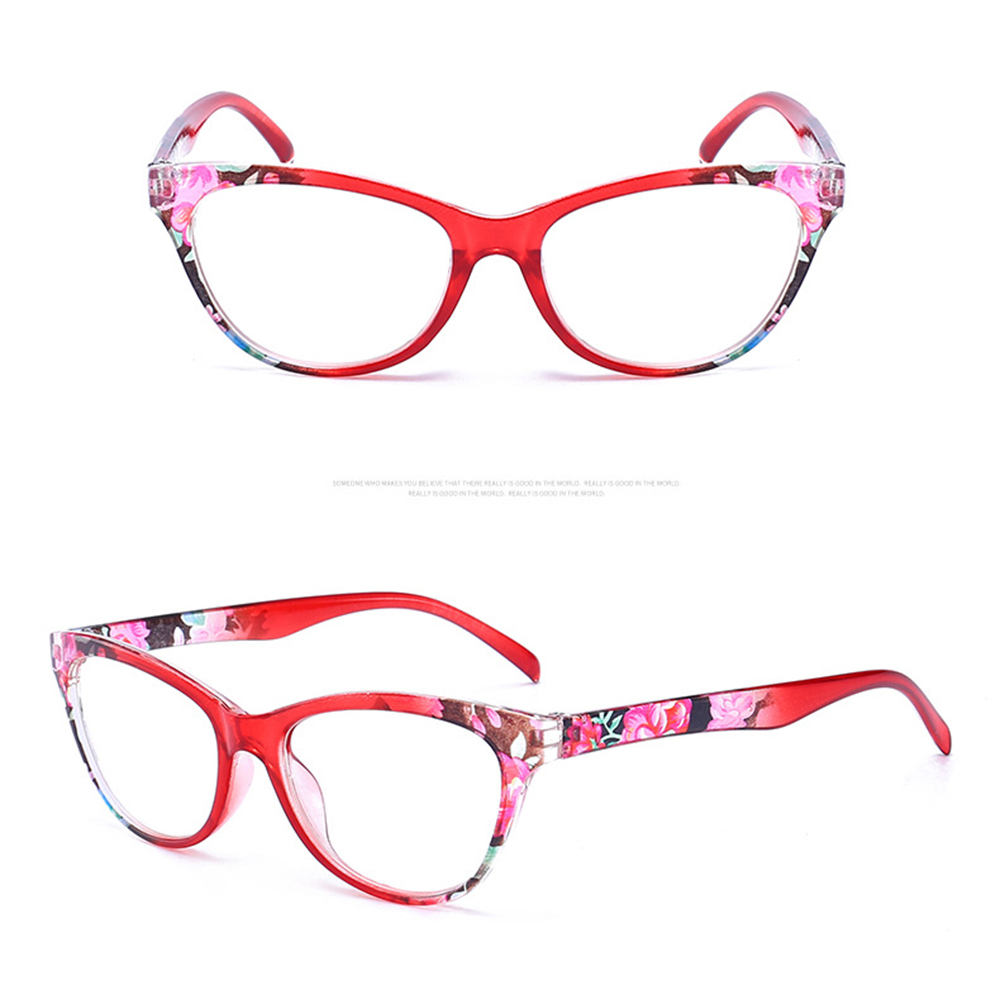
I started looking into glasses specifically designed to alleviate computer eyestrain. That's when I found these incredible Young Round Blue and Red Flower Eye Glasses Frame from Mozaer. They immediately caught my eye not just for their stylish design (I picked the red variant!), but for their features. These glasses are photochromic, meaning they adjust their tint based on light exposure, which is fantastic for moving between different lighting conditions. More importantly, they offer excellent blue light protection. Wearing them creates a gentle filter, softening the harshness of the screen and making long sessions far more tolerable. They come in various reading strengths, so I could choose the exact magnification I needed, which was a huge bonus for close-up document work. It's like having a protective, comfortable layer over my eyes, significantly reducing the fatigue I used to feel. For more great products that help with eye comfort, I often check out the Mozaer homepage.